
Completing your Allama Iqbal Open University (AIOU) assignments for the Autumn 2026 semester involves downloading the official question papers from the university portal, preparing your answers cleanly offline, and uploading the final document to the Aaghi LMS before your course deadline. Because BA and Associate Degree (AD) courses use digital submission, verifying your course codes and file format ahead of time helps prevent rejected uploads or missing marks.
How to submit AIOU assignments before last date?
We are running this account in front of you until the last day of the assignment of Allama Iqbal Open University. It tells you how many days are left to submit your assignment. You should complete your assignment within these days and submit it to your Tutor so that you can take full advantage of it. If you like this feature, then be sure to give your opinion in the comment box now. Thanks.
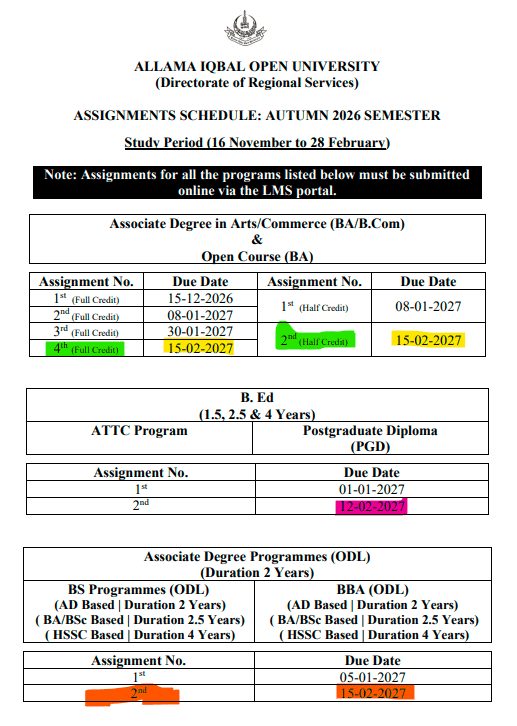
Where can students download AIOU Autumn 2026 assignment questions?
Open AIOU’s official Assignment Question Papers page, choose “Semester Autumn 2026”, and select the Bachelor, ATTC, ADC, ADB, BS, BBA, B.Ed or Postgraduate group that matches your programme. The page also provides the covering form and writing instructions. Save the correct course paper before starting; do not substitute a Autumn 2026 paper.AIOU Autumn 2026 Assignment Question Papers
Course books should be checked through the AIOU website, your student/LMS account or the AIOU app. Keep the question paper and book for each course in a separate folder so that answers for one subject are not mixed with another.
Step 1: Verify Your Registered Courses in CMS
Before downloading any question papers, confirm which subjects are officially registered for your Autumn 2026 semester so you do not prepare the wrong course codes.
- Log in to the AIOU Enrollment CMS Portal using your student ID and password.
- Open Academic Records or Course Registration to verify your active subjects and semester label (Semester 1, 2, 3, or 4).
- Review your AIOU tutor profile details to see your assigned tutor for each subject. If a registered course is missing from Aaghi LMS after admission confirmation, contact your regional campus for assistance.
Step 2: Download AIOU Autumn 2026 Assignment Questions & Books
AIOU publishes semester-specific question sheets on its main portal. Never reuse question papers from previous semesters, as questions change every session.
If your printed textbooks have not arrived yet, download digital copies from the university website, your LMS dashboard, or our collection of AIOU soft books in PDF for all courses.
Visit the Allama Iqbal Open University official website and open the Examination menu, then select Assignments (QP).
Choose Semester Autumn 2026 and open the programme folder that matches your enrollment (such as Bachelor / Associate Degree in Arts or Commerce).
Download the PDF question paper, covering form (parat), and writing instructions for each registered course code.
Keep each course’s question paper and study material in a separate folder on your computer or phone so answers do not get mixed up.
Step 3: Prepare Your Assignment in MS Word
You do not type your answers directly inside the Aaghi LMS browser window. Instead, prepare the entire assignment offline in Microsoft Word (or Google Docs if working on a mobile phone) where your programme permits typed submissions.
Formatting Your MS Word File
- Cover Page (Page 1): Include your Full Name, Student ID / Roll Number, Programme (e.g., Associate Degree in Arts / BA), Course Title, Course Code, Semester (Autumn 2026), and Assignment Number (Assignment 1 or 2).
- Typography & Layout: Use a clear font such as Times New Roman or Arial (size 12 for body text and 14–16 bold for headings) with 1.15 or 1.5 line spacing.
- Original Writing: Read the relevant textbook unit, outline your key points, and explain concepts in your own words. You can follow our guide on how to write AIOU assignments for full marks to structure introductions, subheadings, and conclusions clearly.
Exporting to the Required File Format
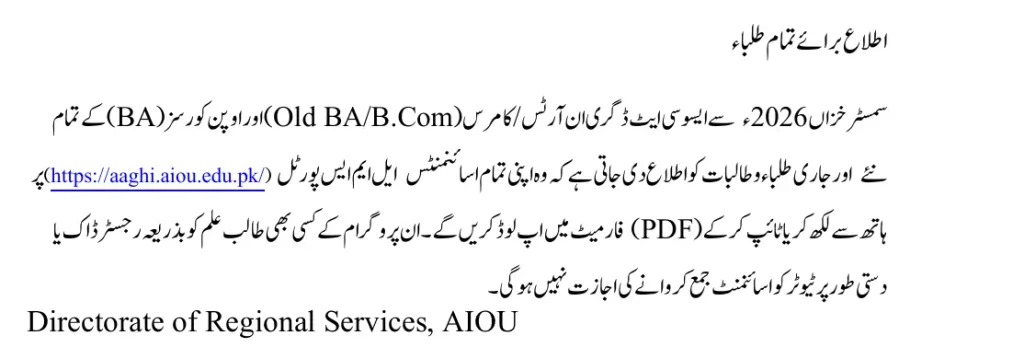
- Check the LMS Activity Rules: For Autumn 2026 Associate Degree (old BA/B.Com) and BA open-course students, published university guidance directs students to upload assignments as PDF files through Aaghi LMS.
- Save as PDF from MS Word: Once your assignment is proofread, click File > Save As (or Export > Create PDF/XPS) in MS Word and save the file as a single
.pdfdocument. Only upload a raw.docxfile if your specific course activity explicitly requests Word format. - Handwritten Option: Where your programme allows handwritten work, write neatly on lined paper, scan every page in portrait orientation in sequential order, and merge them into a single readable PDF within the portal’s file size limit (typically under 5 MB).
Step 4: Upload Your Assignment to the Aaghi LMS Portal
Once your file is saved in the required format, submit it through Aaghi LMS well before the due date to avoid last-minute server traffic.
- Open the Aaghi LMS Portal and select the Autumn 2026 login block.
- Sign in using the username and password sent by AIOU to your registered mobile number via SMS. (If you did not receive the credentials, use the portal’s password recovery option or contact your regional campus.)
- Click My Courses and open the exact subject code you are submitting.
- Select the matching link (for example, Assignment No. 1).
- Click Add Submission, attach your exported PDF file (or Word file if specifically instructed by the activity), and click Save Changes.
- Wait for the page to refresh and confirm that the submission status reads Submitted for grading. Reopen the activity once more to verify the attached file opens properly, and save a screenshot for your records.
Course-Wise Reference Guides for BA / Associate Degree
If you need help understanding question structure and locating relevant textbook chapters before drafting your own answers, you can review our subject guides across core and elective codes—or browse our complete AIOU BA solved assignment directory.
- Compulsory Courses: Review structural guides for Compulsory English 1423 solved assignment, English 1424 solved assignment PDF, Islamiat 416 solved assignment, and Pakistan Studies 417 solved assignment.
- Elective Courses: Check reference outlines for Economics 402 solved assignment PDF, Urdu 404 solved assignment, and Sociology 411 solved assignment.
Once your tutor grades your submission, follow our step-by-step walkthrough on how to check AIOU assignment marks on the LMS portal to verify your scores.
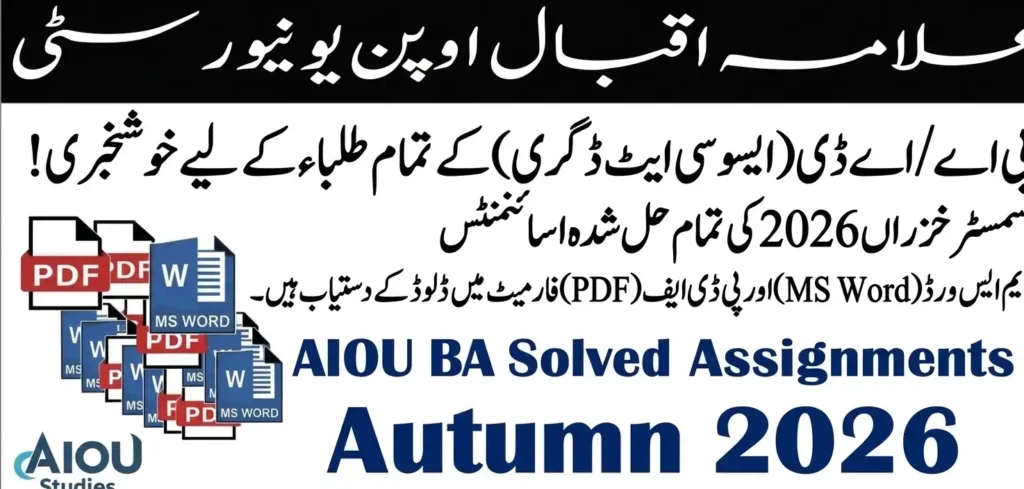
Where can I find an AIOU BA solved assignment for Autumn 2026?
You can review course-wise reference solutions on educational portals like AIOU Studies to see how answers are structured and which textbook chapters apply, then write your own original responses in MS Word before uploading to Aaghi LMS.
Can I upload an MS Word (.docx) file directly to Aaghi LMS?
Only if the specific assignment activity in Aaghi LMS is configured to accept Word files. For Autumn 2026 BA and Associate Degree courses where PDF submission is required, export your MS Word document as a .pdf file before uploading.
What are the passing marks for AIOU BA assignments?
The minimum passing score for BA and Associate Degree assignments is 40% (40 out of 100). Assignments carry a 30% weightage in your overall course assessment while the final written exam carries 70%, and you must pass both components independently.
Can I prepare and upload my AIOU assignment on a mobile phone?
Yes. You can type your assignment on a smartphone using the Microsoft Word or Google Docs mobile app, export it as a PDF, and upload it through your mobile browser on Aaghi LMS.
Can I use ChatGPT or AI tools to write my AIOU assignment?
No. AIOU prohibits plagiarism and copied content from external sources or automated tools. Tutors review submissions for originality, and verbatim AI-generated text risks receiving zero marks.
Do I still need to attend workshops and quizzes after uploading my assignment?
Yes. Submitting your assignment does not replace workshop attendance or online LMS quizzes. Check your Aaghi LMS dashboard regularly for scheduled workshop sessions and required quiz activities.