
How to submit AIOU assignments before last date?
We are running this account in front of you until the last day of the assignment of Allama Iqbal Open University. It tells you how many days are left to submit your assignment. You should complete your assignment within these days and submit it to your Tutor so that you can take full advantage of it. If you like this feature, then be sure to give your opinion in the comment box now. Thanks.
Where can students download AIOU Autumn 2026 assignment questions?
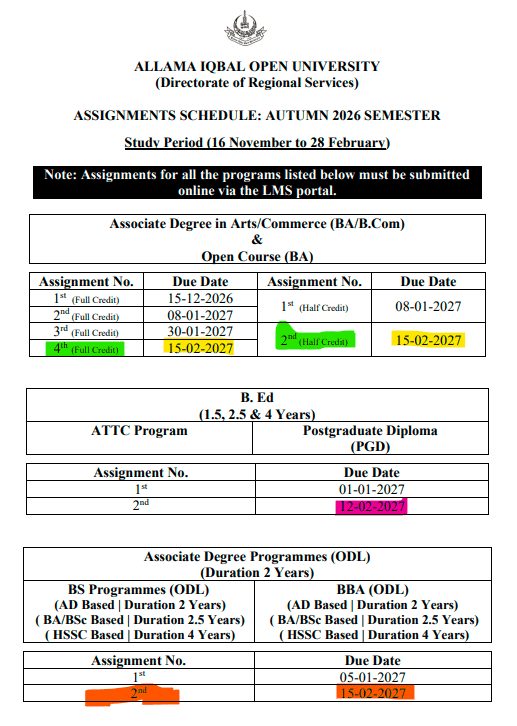
Open AIOU’s official Assignment Question Papers page, choose “Semester Autumn 2026”, and select the Bachelor, ATTC, ADC, ADB, BS, BBA, B.Ed or Postgraduate group that matches your programme. The page also provides the covering form and writing instructions. Save the correct course paper before starting; do not substitute a Autumn 2026 paper.AIOU Autumn 2026 Assignment Question Papers
Course books should be checked through the AIOU website, your student/LMS account or the AIOU app. Keep the question paper and book for each course in a separate folder so that answers for one subject are not mixed with another.
How do you prepare an assignment in MS Word without typing inside Aaghi?
Prepare the work offline. You may type answers in Microsoft Word or write them by hand where your programme allows it. You do not need to type answers into the Aaghi portal. Add a cover page with your name, student ID, programme, course code, semester, assignment number and tutor details if available. Use your own words, clear headings and references. Check every answer before uploading.
What are the six steps to submit an AIOU Autumn 2026 assignment?
- Check your course: Sign in to CMS and Aaghi. Confirm your course is listed for Autumn 2026 and note the semester label, including Semester 1 where applicable. If it is missing, check admission confirmation and contact your regional office.
- Get the right questions: Open AIOU’s Assignment Question Papers page, select your programme and semester, and find the course code. Download the questions and course book; keep each subject in a separate folder.
- Complete the answers offline: Use MS Word or handwriting as permitted by your programme. Use the course book, explain ideas clearly and do not copy a solved assignment word for word.
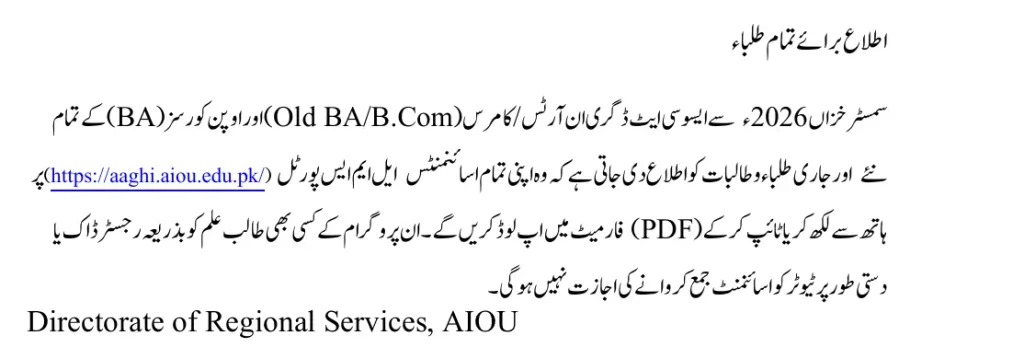
- Create one PDF: For Autumn 2026 Associate Degree in Arts/Commerce (old BA/B.Com) and BA open-course students, published guidance reports that assignments are to be uploaded as PDF files through Aaghi. If handwritten, scan all pages in order and combine them into one readable PDF. If typed in Word, export the document as PDF. Check page orientation and readability. Other programmes should follow their own LMS file instructions.
- Upload on Aaghi: Sign in at aaghi.aiou.edu.pk using the credentials sent by AIOU. Open the Autumn 2026 course, select the correct assignment activity and number, attach the required file and press Submit/Upload. For the BA/AD route above, this means the PDF. Wait for the portal to display a submitted status.
- Review the submission: Reopen the assignment activity, confirm the right file is attached and save a screenshot or confirmation. Check your workshop schedule in Aaghi or on AIOU’s workshop-information page. Where your course notice requires an online workshop quiz, attend and attempt it.
Which semesters and subjects should Associate Degree in Arts students check?
AIOU lists the Associate Degree in Arts (BA) as a two-year ODL programme with four semesters and 66 credit hours. The medium is English or Urdu. Check your own CMS course registration; not every elective belongs to every student’s plan.
Semester 1 includes 416 Islamiyat (or 418 Ethics for non-Muslim students), 417 Pakistan Studies and 1423 Compulsory English-I, plus one general elective.
Semester 2 lists 1424 Compulsory English-II, 1429 Business Mathematics and 1431 Basics of Information and Communication Technology, with the permitted elective combination.
Semesters 3 and 4 use the elective choices in the programme structure. Confirm your own subjects in CMS before searching.
What are the steps to upload an Autumn 2026 assignment on Aaghi LMS?
Confirm admission and course registration in CMS. AIOU says courses appear in Aaghi after admission is confirmed; contact your regional campus if a registered course is still missing.
Download the Autumn 2026 question paper, covering form and instructions from the official assignment page. Check the course code and due date before you begin.
Prepare answers offline in Word or by hand, according to the rules for your programme. Use your course book, answer every question and put the pages in the correct order.
Save the file in the required format. Export a typed Word assignment to PDF when PDF is requested; scan handwritten pages into one clear PDF if handwritten work is permitted.
Sign in to https://aaghi.aiou.edu.pk with the credentials sent by AIOU. Open the Autumn 2026 course and select the matching assignment activity. If the SMS did not arrive, use password recovery or contact your regional campus.
Attach the correct file, submit it and wait for the status or confirmation. Reopen the activity to check the attachment, then keep a screenshot or submission record.
AIOU’s FAQ says specified ODL programmes submit through Aaghi, while SSC/HSSC assignments go to tutors. The route is programme-specific, so follow the method shown for your own course.AIOU Aaghi LMS
What about workshops, quizzes and assignment deadlines?
Check the assignment and workshop schedules regularly. AIOU advises students to check Aaghi for workshop dates and also publishes workshop information online. Attend your course sessions and complete any required quiz or attendance activity; submitting an assignment does not replace these requirements.
Are Autumn 2026 assignment papers available?
Yes. AIOU’s official Assignment Question Papers page currently lists the Autumn 2026 Bachelor and other programme groups.
Can I upload a Word document directly?
Only when the assignment activity accepts Word files. If it asks for PDF, export your Word document or scan permitted handwritten pages as one PDF.
What if my Autumn 2026 course is not visible in Aaghi?
Check that admission is confirmed in CMS. AIOU states that courses are added to Aaghi after admission confirmation; contact your regional campus if the course remains missing.
Do all four semesters have the same assignment questions?
No. Use the questions and course codes for your own semester and registered courses. Semester 1, 2, 3 and 4 selections are not interchangeable.
Where can I check the workshop schedule?
Check your Aaghi account and AIOU’s official Workshop Information page. Keep an eye on course notices for quiz and attendance requirements.